The family Dashboard
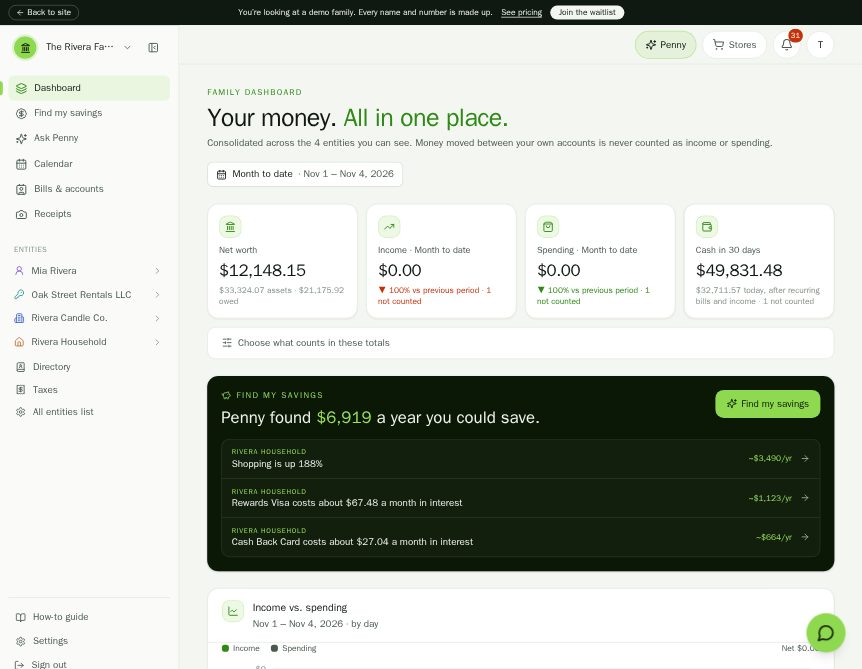
Every entity’s money rolled up into one screen: cash, income, spending, what’s coming up.
Where it is in the app
Sidebar → Dashboard (Home on a phone). Clicking the round logo at the top also brings you here.
How it works
- 1The boxes at the top show Income, Debt and Spending across all entities for the date range you choose. Tap the little arrow in a box’s corner to show something else instead: net worth, what’s left over, cash today, cash in 30 days or bills due in the next 30 days. Your choice is saved to your account.
- 2Below that: the Find my savings card (Penny’s total and her top three finds), income vs. spending (with exactly how much came in and went out for the period in its top right corner), what’s coming up in the next 30 days, budgets, goals and recent activity.
- 3Click any entity card to jump into that entity.
Want this for your family?
Hold my spot, free