Lesson 10.1
Keep business money separate
Separate accounts, and paying yourself with owner draws. 4 min read
The big ideaGive the business its own bank account, and move money between it and home only on purpose.
Most side businesses start in the family checking account. A few sales come in, a few supplies go out, and soon nobody can tell whether the business makes money at all.
The fix is simple: the business gets its own checking account, and ideally its own card. Every business sale goes in there. Every business cost comes out of there. Nothing personal touches it.
Why it matters
- You can see real profit at a glance, without sorting through groceries and school lunches.
- Tax time is faster, because the business account is the business record.
- If you have an LLC, keeping money separate helps show the business really is separate from you.
- If the IRS ever asks questions, clean records are much easier to explain.
Moving money on purpose
Money will still need to cross between home and business. Name each move. An owner contribution is money you put into the business from home. An owner draw is money you take out of the business for yourself.
Example · Rivera Candle Co.
Maria opened a business checking account with a $500 owner contribution from the Rivera Household. In March the shop sold $3,200 of candles and spent $1,100 on wax, wicks and jars, a $2,100 profit. She moved $1,500 home as an owner draw and left the rest in the business for April’s supplies.
For a sole proprietor or single-member LLC, an owner draw isn’t a business expense. Tax is based on the business’s profit, not on how much you take out.
Key notes
- One business, one bank account (and ideally one card). No personal spending from it.
- Money in from home is an owner contribution; money out to home is an owner draw.
- Draws don’t lower your taxable profit. Profit is sales minus business costs.
- If you slip and pay a personal bill from the business, record it as an owner draw right away.
A steward’s view
Clear, honest books are a mark of integrity in business.
Do it in the app
Give the business its own books
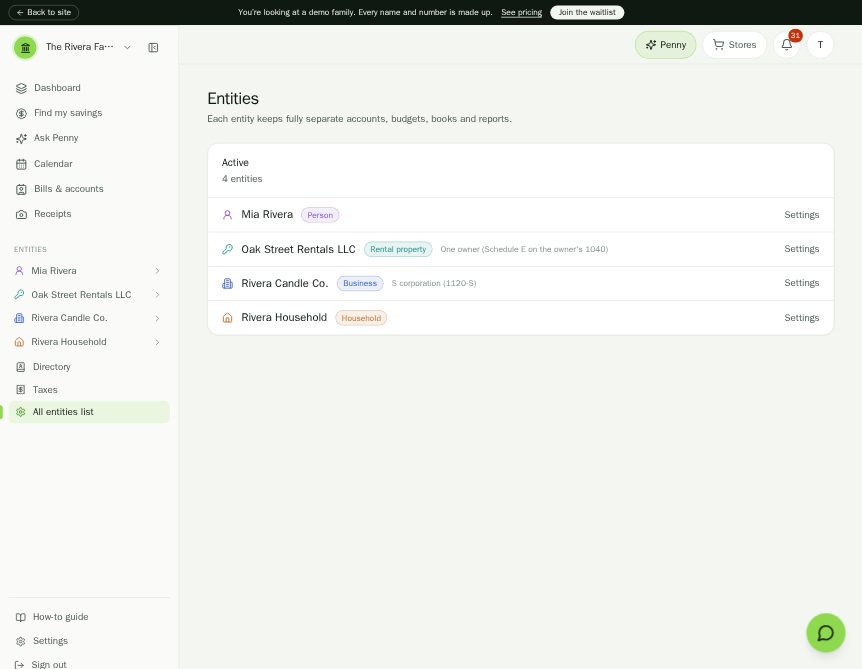
- 1Open All entities list → Add an entity and pick Business. It gets its own accounts, budget, books and reports, and still rolls up on the Dashboard.
- 2When money moves home, open that transaction and pick Owner draw (or Owner contribution) from the category list, then choose the other entity.
- 3Both entities’ books update together, so the money isn’t counted twice. See Moving money between your entities in the guide.
Quick quiz
3 questions
Go deeper
- Small Time Operator, Bernard KamoroffA plain guide to bookkeeping and the basics of running a small business.
Track this automatically in Stackyard
Connect your accounts once and Penny watches for this every time your banks sync.
For education only; not financial, tax or legal advice. Store rules, rates and tax figures change; check the source before you act.