Reports
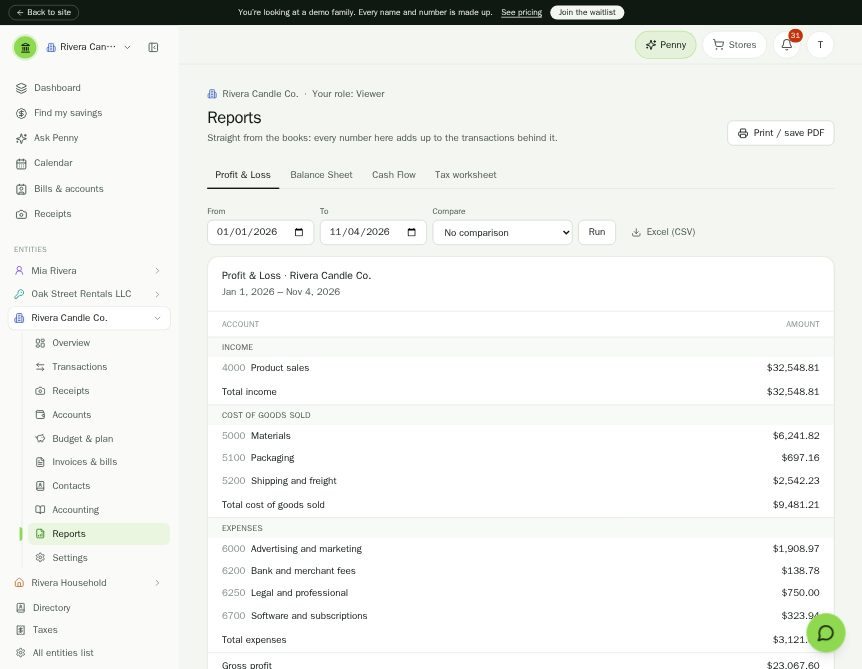
Profit & Loss, Balance Sheet and Cash Flow, straight from the books. The tax worksheet is on each entity’s Taxes page.
Where it is in the app
Sidebar → click an entity → Reports.
How it works
- 1Pick the report and the date range at the top.
- 2On the Profit & Loss, tap any category (or its amount) to open Transactions showing just that category and its sub-categories for the same dates. "Back to the report" returns you.
- 3Want something the standard reports don’t show? Use "Ask Penny for a report" at the top: type it (like "shipping costs by month this year") or tap an idea such as "Profit by month this year". Penny builds a table from the same books, with links to the full report and the transactions.
- 4Export any report as a CSV file (opens in Excel or Google Sheets) for your accountant.
Want this for your family?
Hold my spot, free