Lesson 2.3
Categories that make sense
Fewer, clearer categories beat 80 tiny ones. 4 min read
The big ideaA budget with 15 clear categories gets used; one with 80 tiny ones gets abandoned.
It’s tempting to track everything in detail: coffee, lunch, snacks and gum, each on its own line. But every extra category is one more thing to sort and one more line to check.
Good categories answer the questions you actually ask, like “What do we spend on food?” and “What does the car really cost?”
A starter list for most families
- Housing, Utilities, Groceries, Eating out, Transportation, Insurance, Health.
- Kids, Debt payments, Giving, Subscriptions, Fun, Personal, Savings.
Example · The Rivera family
The Riveras started with 47 categories and gave up after two weeks. They merged them down to 14, using the starter list above. Now sorting a month takes about ten minutes, and the budget fits on one screen.
When more detail helps
Use a sub-category when one area needs a closer look. If the car feels expensive, split Transportation into Gas, Repairs and Parking. Once you understand it, you can stop watching so closely.
Business and rental books are different. They need categories that match tax lines, so keep those separate from the household list.
If you can’t decide where something goes in five seconds, your categories are too fine. Merge them.
Key notes
- Aim for about 12 to 20 categories.
- Pick categories that answer questions you really ask.
- Use sub-categories only where you need a closer look.
- Keep business and rental categories separate from the household.
A steward’s view
Simple categories make it easy to see what your family values most, including what you give and what you save.
Do it in the app
Tidy your categories
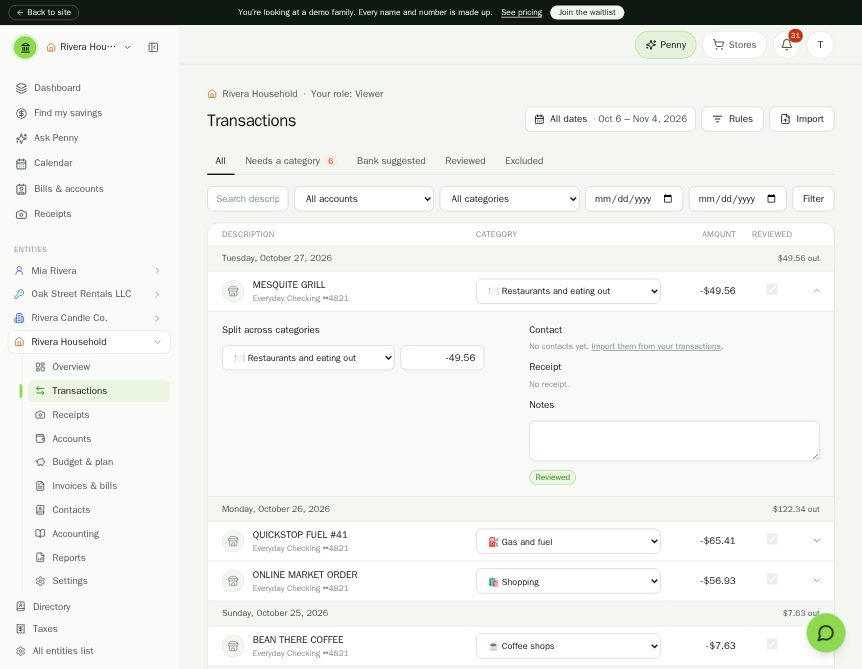
- 1Open Transactions and click any transaction to open its details. Pick a category, then Save all to put every similar transaction there too.
- 2Leave “Always do this for new ones” on, so future ones are sorted for you.
- 3Need more detail? Tap + Add sub-category (like Repairs under Transportation) and use it right away.
Quick quiz
3 questions
Track this automatically in Stackyard
Connect your accounts once and Penny watches for this every time your banks sync.
For education only; not financial, tax or legal advice. Store rules, rates and tax figures change; check the source before you act.